How to Add a Workout to Apple Fitness: Easy Steps for Success
Are you looking to make your Apple Fitness experience even better? Adding a workout to Apple Fitness can help you stay on track and meet your fitness goals faster.
Whether you want to try a new exercise or keep all your workouts organized, knowing how to add a workout is a game-changer. In this guide, you’ll discover simple steps to customize your fitness routine right on your device. Keep reading to unlock the full potential of Apple Fitness and take control of your health like never before.

Credit: www.tiktok.com
Setting Up Your Apple Fitness Account
Before you can add workouts to Apple Fitness, setting up your account properly is essential. This foundation ensures a smooth experience as you track your progress and stay motivated. Let’s look at how to get your Apple Fitness account ready.
Creating An Apple Id
Your Apple ID is the key to accessing Apple Fitness and syncing your workout data across devices. If you don’t have one yet, creating an Apple ID is straightforward and free.
Head to the Apple ID website or use your iPhone’s Settings app to create a new account. You’ll need to provide basic info like your name, email, and a secure password.
Keep your Apple ID details handy, as you’ll use them to sign in on your Apple devices and Apple Fitness. Have you checked if your email is linked to any existing Apple services? That can simplify the process.
Ensuring Device Compatibility
Apple Fitness works best on certain devices, so it’s crucial to confirm your gear supports the app. Typically, this means having an iPhone running iOS 14.3 or later, an Apple Watch Series 3 or newer, or an iPad with the latest software.
If your device isn’t compatible, you might miss out on features like heart rate tracking or personalized workout suggestions. Don’t worry if you’re unsure—just check the “About” section in your device settings or visit Apple’s official compatibility page.
Have you ever tried to start a workout only to realize your device wasn’t supported? Avoid that frustration by verifying compatibility first. It saves time and keeps your fitness journey on track.
Navigating The Apple Fitness Interface
Navigating the Apple Fitness interface is simple and user-friendly. It helps you track workouts and stay motivated. Understanding the layout makes adding workouts easy and quick.
Exploring The Fitness App
The Fitness app opens to a summary of your daily activity. You see your Move, Exercise, and Stand rings at the top. Below, the app shows your recent workouts and achievements.
Tabs at the bottom help you find different sections:
- Summary:View your activity rings and daily progress.
- Workouts:Browse past workouts and add new ones.
- Sharing:Connect with friends and share achievements.
- Fitness+:Access guided workouts if subscribed.
Understanding Key Features
Adding workouts requires knowing a few key features. The app syncs with your Apple Watch to record workouts automatically. You can also add workouts manually if needed.
Look for the “Add Workout” button in the Workouts tab. You can choose workout type, duration, and calories burned. The app tracks your heart rate and activity rings during workouts.
Notifications remind you to stay active and close your rings. The app also offers weekly summaries to help you review progress.
Selecting The Right Workout
Selecting the right workout is key to staying motivated and reaching fitness goals. Apple Fitness offers many options to suit different needs and preferences. Choosing the best workout type and setting personal goals helps create a clear path for progress. This section guides you through these important steps.
Choosing Workout Types
Apple Fitness includes workouts like yoga, strength training, running, and cycling. Each workout has a unique focus and benefits. Pick a workout that matches your fitness level and interests. Variety keeps exercise fun and prevents boredom. Consider workouts that fit your schedule and available equipment.
- Cardio workouts improve heart health and endurance.
- Strength training builds muscle and tones your body.
- Yoga enhances flexibility and reduces stress.
- Dance workouts boost energy and coordination.
Selecting workouts you enjoy increases the chance of regular exercise. Listen to your body and choose workouts that feel right.
Setting Personal Goals
Goals give direction and purpose to your workouts. Start with simple, clear goals that fit your lifestyle. Examples include exercising three times per week or improving stamina. Track your progress using Apple Fitness metrics like calories burned and workout duration. Adjust goals as you improve to stay challenged.
- Set realistic goals based on your current fitness.
- Break big goals into smaller, achievable steps.
- Celebrate milestones to keep motivation high.
- Use reminders to build a workout habit.
Personal goals help keep focus and measure success. They turn workouts into a meaningful routine rather than a chore.

Credit: www.youtube.com
Adding A Workout To Apple Fitness
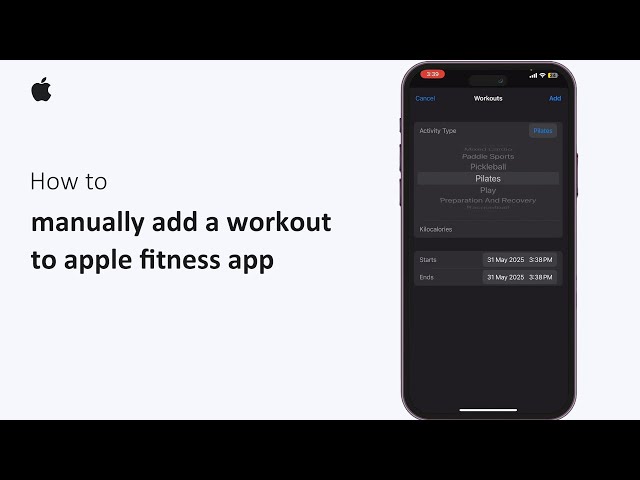
Adding a workout to Apple Fitness helps you track your exercises easily. It keeps your fitness goals organized and clear. You can choose from many workout types or create one that fits your needs. This section explains how to add and customize workouts in Apple Fitness.
Using The Workout Library
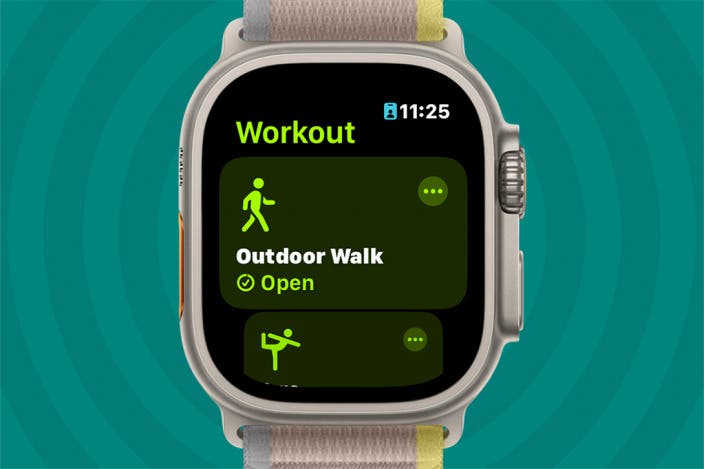
The Workout Library offers many exercise options. You can select workouts like running, cycling, or yoga. Each workout has details like duration and calories burned. Simply open the Fitness app and tap the “Workouts” tab. Scroll through the list to find a workout that fits your plan.
Tapping on a workout starts it immediately. The app tracks your activity and shows real-time stats. This feature helps you stay motivated and on track. You can also save favorite workouts for quick access later.
Customizing Your Workout
Apple Fitness lets you tailor workouts to match your goals. Choose the workout type and set your target time or calories. You can add intervals or rest periods for more control. The app also allows you to change the music or coaching style.
To customize, open a workout and tap the settings icon. Adjust the options to fit your level and preferences. These changes help keep your workouts interesting and effective. Custom workouts make your fitness journey personal and fun.
Tracking Your Progress
Tracking your progress in Apple Fitness turns your workout routine into a clear path of improvement. It’s not just about finishing exercises; it’s about understanding how each session moves you closer to your goals. Paying attention to your data helps you adjust and stay motivated.
Monitoring Metrics
Apple Fitness provides detailed metrics that show your performance in real time. You can see calories burned, heart rate, workout duration, and even specific exercise counts. These numbers give you immediate feedback on how hard you’re working.
Keep an eye on your heart rate zones to know if you’re pushing enough or if you need to ease up. Tracking calories can help if weight management is your goal. Seeing your workout time increase over weeks proves you’re building stamina.
Reviewing Achievements
Apple Fitness celebrates your milestones with badges and awards, which can be surprisingly motivating. Each badge reflects a specific achievement, like closing your rings consistently or hitting a new personal best.
Look back at your weekly and monthly summaries to spot trends. Are you improving your endurance? Are you missing workouts on certain days? These insights help you plan smarter sessions.
Have you noticed how little wins keep you coming back? Tracking achievements isn’t just about rewards; it’s about recognizing your growth and staying committed.
Credit: www.iphonelife.com
Enhancing Your Fitness Experience
Enhancing your fitness experience with Apple Fitness makes workouts more effective and fun. Adding workouts is just the start. Using tools and features can keep you motivated and engaged. These extras help you track progress and enjoy each session more. Small changes can lead to big improvements in your routine.
Integrating With Other Apps
Apple Fitness works well with many health and fitness apps. Syncing these apps lets you see all your data in one place. You can connect apps for running, cycling, or meditation. This helps you track your full fitness journey easily.
Apps like MyFitnessPal or Strava share info with Apple Fitness. This means calories burned, distance, and heart rate update automatically. You get a clearer view of your health without extra work.
Using Music And Audio Guides
Music and audio guides make workouts more enjoyable. Apple Fitness lets you play music directly during workouts. Choose playlists that match your workout type or mood.
Audio guides offer coaching and motivation. They keep you focused and help maintain proper form. Hearing a voice can push you to finish strong.
Troubleshooting Common Issues
Adding a workout to Apple Fitness should be a smooth process, but sometimes things don’t go as planned. You might find your workout data isn’t syncing correctly, or the app doesn’t recognize your new exercise. These hiccups can be frustrating, especially when you’re eager to track your progress.
Resolving Sync Problems
Sync issues often happen because your devices aren’t communicating properly. First, check that your iPhone, Apple Watch, or iPad is connected to the internet and Bluetooth is on. Sometimes, simply restarting your devices can fix the problem.
If your workout still doesn’t appear, try logging out of your Apple ID and logging back in. This action refreshes your account data and can clear any stuck sync processes. Also, make sure your apps and device software are up to date—outdated versions can cause compatibility glitches.
Consider this: have you recently switched devices or updated your software? That’s often when syncing breaks. Keep your devices close together during syncing to avoid connection drops.
Contacting Support
If you’ve tried basic fixes and your workout still isn’t adding, it might be time to reach out for help. Apple Support can guide you through more advanced troubleshooting steps tailored to your device and situation.
Before contacting support, gather details like your device model, iOS version, and a description of the problem. Clear information speeds up the process and helps the support team find solutions faster.
You can contact Apple Support via phone, chat, or email. Visiting an Apple Store for in-person help is also an option if you prefer hands-on assistance. Remember, you’re not alone—getting help is part of making your fitness journey easier.
Frequently Asked Questions
How Do I Add A Workout To Apple Fitness?
Open the Fitness app, tap the Workout tab, then select “Add Workout. ” Choose your workout type and start tracking immediately.
Can I Customize Workouts In Apple Fitness?
Yes, Apple Fitness allows customization by selecting workout type, duration, and goals before starting the session.
Does Apple Fitness Sync Workouts With Apple Watch?
Yes, workouts started on Apple Watch automatically sync with the Fitness app on your iPhone for seamless tracking.
How To Track A New Workout Type In Apple Fitness?
If your workout type isn’t listed, choose “Other” to track it manually and save the session in the app.
Conclusion
Adding a workout to Apple Fitness helps track your progress easily. It keeps your exercise routine organized and simple to follow. You can choose workouts that fit your goals and schedule. Staying active becomes more fun and motivating this way.
Try adding different workouts to find what suits you best. Small steps lead to big health benefits over time. Keep moving, stay healthy, and enjoy your fitness journey.

Similar Posts