How to Use Apple Fitness App: Ultimate Guide to Boost Your Workouts
Are you ready to make your workouts smarter and more fun? The Apple Fitness app is designed to help you stay motivated, track your progress, and reach your fitness goals—all from your iPhone or Apple Watch.
Whether you’re just starting out or looking to level up your routine, this app puts expert guidance and personalized workouts right at your fingertips. Keep reading, and you’ll discover simple steps to get the most out of the Apple Fitness app and transform how you move every day.

Credit: apps.apple.com
Getting Started With Apple Fitness
Getting started with the Apple Fitness app is simple and quick. This app helps you stay active and track your workouts. It works well with Apple devices to give you a smooth fitness experience. Follow these steps to begin your fitness journey.
Downloading The App
Find the Apple Fitness app in the App Store on your iPhone or iPad. Tap the download button to install it. The app is free for Apple users. Make sure your device runs the latest iOS version for the best experience.
Setting Up Your Profile
Open the app after installation. Enter your basic information like age, weight, and height. This data helps the app give you accurate fitness insights. Choose your fitness goals to tailor workouts that fit your needs. The setup only takes a few minutes.
Syncing Devices
Connect your Apple Watch or other compatible devices to the app. This allows the app to track your activity and heart rate. Turn on Bluetooth on both devices to enable syncing. Check that your devices stay connected during workouts for accurate tracking.
Exploring Workout Options
The Apple Fitness app offers a variety of workout options to suit different fitness levels and goals. Each workout type is designed to help you stay active and healthy. You can choose from cardio, strength training, yoga, and mindfulness sessions. The app guides you through each exercise with clear instructions and visuals.
Cardio Workouts
Cardio workouts improve heart health and increase stamina. The Apple Fitness app includes running, cycling, and HIIT sessions. These workouts often involve intervals to boost calorie burn. You can select the duration and intensity that fits your schedule. Real-time metrics like heart rate and calories burned keep you motivated.
Strength Training
Strength training builds muscle and tones your body. The app offers workouts with weights, resistance bands, or bodyweight exercises. Trainers demonstrate proper form to prevent injury. You can focus on different muscle groups, such as arms, legs, or core. Progress tracking helps you stay consistent and see results.
Yoga And Mindfulness
Yoga and mindfulness workouts enhance flexibility and reduce stress. The app provides guided sessions for beginners and advanced users. You can choose from gentle stretches to power yoga flows. Breathing exercises and meditation help improve mental focus. These workouts promote balance between body and mind.
Personalizing Your Fitness Goals
Personalizing your fitness goals in the Apple Fitness app helps you stay motivated and focused. It tailors your workouts and progress tracking to fit your needs. This way, you can achieve better results at your own pace.
Setting Objectives
Start by choosing clear and simple fitness objectives. The app lets you set goals for moving, exercising, and standing. Pick targets that feel challenging but reachable. This keeps you motivated without feeling overwhelmed.
Focus on what matters most to your health. You can adjust goals based on your daily routine and energy levels. The app also suggests goals based on your past activity.
Tracking Progress
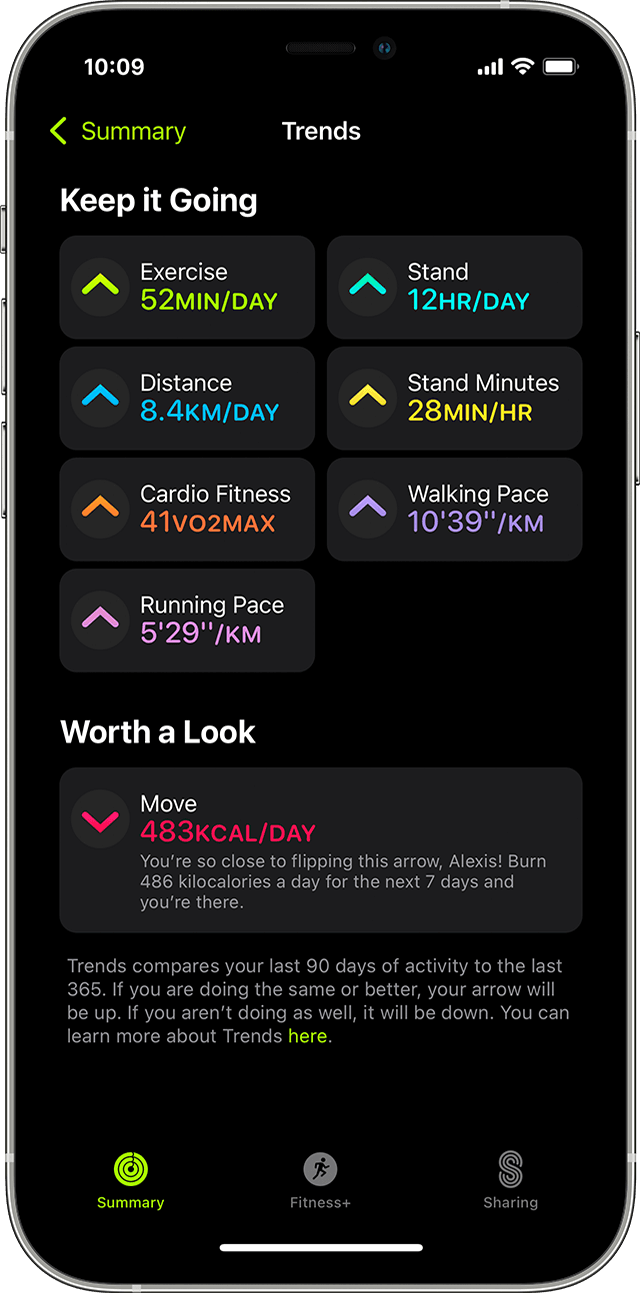
The Apple Fitness app tracks your daily and weekly activity. It shows your steps, calories burned, and workout minutes. Visual charts make it easy to see how you improve over time.
Check your progress often to stay on track. Celebrate small wins to boost your confidence. The app sends reminders and updates to keep you engaged.
Adjusting Goals
Adjust your goals as you grow stronger or your schedule changes. The app makes it simple to raise or lower your targets. This keeps your goals realistic and aligned with your progress.
Changing goals helps prevent boredom and plateaus. Keep your fitness plan fresh by updating it regularly. The app supports flexibility, so your goals always fit your life.

Credit: apps.apple.com
Utilizing Apple Fitness Plus
Utilizing Apple Fitness Plus enhances your workout experience with guided exercises and expert coaching. The app offers a wide range of workouts suited for all fitness levels. It also syncs with your Apple Watch to track your progress in real time. This feature helps keep you motivated and informed during your training sessions.
Accessing Exclusive Content
Apple Fitness Plus provides exclusive workout videos unavailable elsewhere. These sessions include strength training, yoga, cycling, and more. New content is added regularly to keep your routine fresh. You can filter workouts by duration, trainer, and music style. The app also offers mindful cooldowns to help your body recover.
Integrating With Apple Music
Workouts on Apple Fitness Plus come with curated playlists. These playlists match the workout’s pace and style perfectly. The app syncs with Apple Music to play your favorite songs. You can enjoy seamless music without switching apps. This integration boosts energy and focus during exercises.
Creating Custom Playlists
You can create your own playlists directly in Apple Fitness Plus. Choose songs that motivate you the most. Save these playlists for future workouts to stay consistent. Custom playlists make each session more personal and enjoyable. They help maintain a steady rhythm to improve performance.
Enhancing Workouts With Apple Watch
Using the Apple Watch alongside the Apple Fitness app can change how you approach your workouts. The watch offers real-time data that helps you stay focused and make adjustments on the go. This hands-on feedback can push you to new limits or help you maintain a steady pace.
Monitoring Heart Rate
Your Apple Watch tracks your heart rate continuously during exercise. This information shows how hard your heart is working, so you can adjust your effort to meet your fitness goals.
For example, if your heart rate spikes too high, you might slow down to avoid overexertion. On the other hand, if it stays too low, you may want to increase intensity. Have you noticed how knowing your exact heart rate helps you avoid burnout or reach a new personal best?
Calorie Tracking
The watch calculates calories burned based on your activity and heart rate. This feature helps you understand how much energy you expend, making weight management or fitness improvements clearer.
It’s motivating to see how a quick walk or a longer run impacts your daily calorie count. You might realize some workouts burn more calories than you expected. How might this knowledge influence your daily exercise choices?
Workout Metrics
Apple Watch provides detailed workout metrics such as pace, distance, and active minutes. These numbers give you clear goals and benchmarks to improve over time.
For example, tracking your pace helps you stay consistent during runs or cycling. Seeing your progress week by week can keep you motivated. What metric matters most to you when tracking your workouts, and how could focusing on it change your routine?
Leveraging Community Features
The Apple Fitness app offers strong community features that keep users motivated. Connecting with others makes workouts more fun and helps maintain consistency. Sharing progress and competing in challenges create a sense of belonging. These features turn exercise into a social activity.
Joining Challenges
Challenges push you to move more and reach goals. The app offers monthly or special event challenges. Joining these challenges lets you compete with others worldwide. It adds excitement and a goal to work toward. You can track your progress and see how you rank.
Sharing Achievements
Sharing your workout milestones boosts motivation. The app lets you share achievements with friends or family. Celebrate closing rings, completing workouts, or hitting new records. This creates encouragement from your community. Positive feedback inspires you to keep going.
Connecting With Friends
Adding friends in the Apple Fitness app creates a support system. You can view each other’s activity and cheer progress. Friendly competition pushes everyone to improve. It’s easy to send messages or share workout ideas. Staying connected makes fitness a team effort.
Tips For Maximizing Your Fitness App Experience
Getting the most out of the Apple Fitness app means more than just tracking your workouts. It’s about making the app work for you in a way that keeps you engaged, challenged, and motivated. Here are some practical tips to help you enhance your experience and stay on top of your fitness goals.
Utilizing Notifications
Notifications are your personal fitness reminders. Instead of ignoring them, customize alerts to fit your schedule and fitness routine. This way, you get timely nudges that encourage you to move, stretch, or complete a workout without feeling overwhelmed.
For example, setting a reminder to stand or breathe during busy workdays can improve your overall wellbeing. Have you thought about which notifications push you to take action versus those you dismiss? Tailoring these can make a huge difference in staying consistent.
Exploring New Workouts
Don’t stick only to your favorite workout types. The Apple Fitness app offers a wide variety of classes, from yoga to HIIT, that can keep your routine fresh and exciting. Trying new workouts can uncover hidden strengths or interests you didn’t know you had.
Jumping into a dance or core strengthening session once a week can break monotony and challenge your body in new ways. What new workout will you try this week to surprise yourself?
Staying Motivated
Motivation can fluctuate, but the app’s features can help keep your momentum going. Use activity sharing to connect with friends and celebrate small wins together. This social aspect adds accountability and makes workouts more fun.
Tracking progress visually through rings and badges can also fuel your drive. Think about what motivates you most—competition, rewards, or personal growth—and use those motivators to keep pushing forward.
Credit: medium.com
Frequently Asked Questions
What Devices Support The Apple Fitness App?
Apple Fitness app works on iPhone, Apple Watch, and iPad. It requires watchOS 7. 2 or later and iOS 14. 3 or later. Compatibility ensures smooth tracking and access to workout features across these Apple devices.
How Do I Track Workouts With Apple Fitness App?
Open the Fitness app on your Apple Watch or iPhone. Select a workout type and start exercising. The app records your activity, calories burned, and heart rate in real-time for accurate progress tracking.
Can I Customize Workout Goals In Apple Fitness?
Yes, you can set personalized goals for Move, Exercise, and Stand rings. Adjust goals based on your fitness level to stay motivated. The app provides reminders and achievements to help meet these targets.
Is Apple Fitness App Free To Use?
The Apple Fitness app is free to access with basic features. However, Apple Fitness+ subscription is required for guided workouts and premium content. Apple Fitness+ offers a 1-month free trial for new users.
Conclusion
Using the Apple Fitness app can help you stay active daily. It tracks your workouts and motivates you to move. You can set simple goals and watch your progress grow. The app works well with other Apple devices, making fitness easy.
Start small, stay consistent, and enjoy the benefits. Fitness becomes fun and part of your routine. Try different workouts to keep things fresh. Your health will improve step by step. The Apple Fitness app supports a healthier lifestyle for everyone.