How to Watch Sports Without Cable: Ultimate Guide to Streaming Live
Are you tired of paying for expensive cable just to watch your favorite sports? You’re not alone.
Cutting the cord doesn’t mean missing out on the big game. Imagine having easy access to live sports without the hassle or high costs. You’ll discover simple, effective ways to watch sports without cable. Keep reading, and you’ll find the best options tailored just for you—so you never have to miss a moment of the action again.

Credit: www.tvguide.com
Streaming Services Overview
Cutting the cord doesn’t mean missing out on your favorite sports. Streaming services now offer a wide range of options to watch live games, highlights, and expert analysis. Understanding these platforms can help you pick the right one that fits your budget and favorite sports.
Popular Platforms
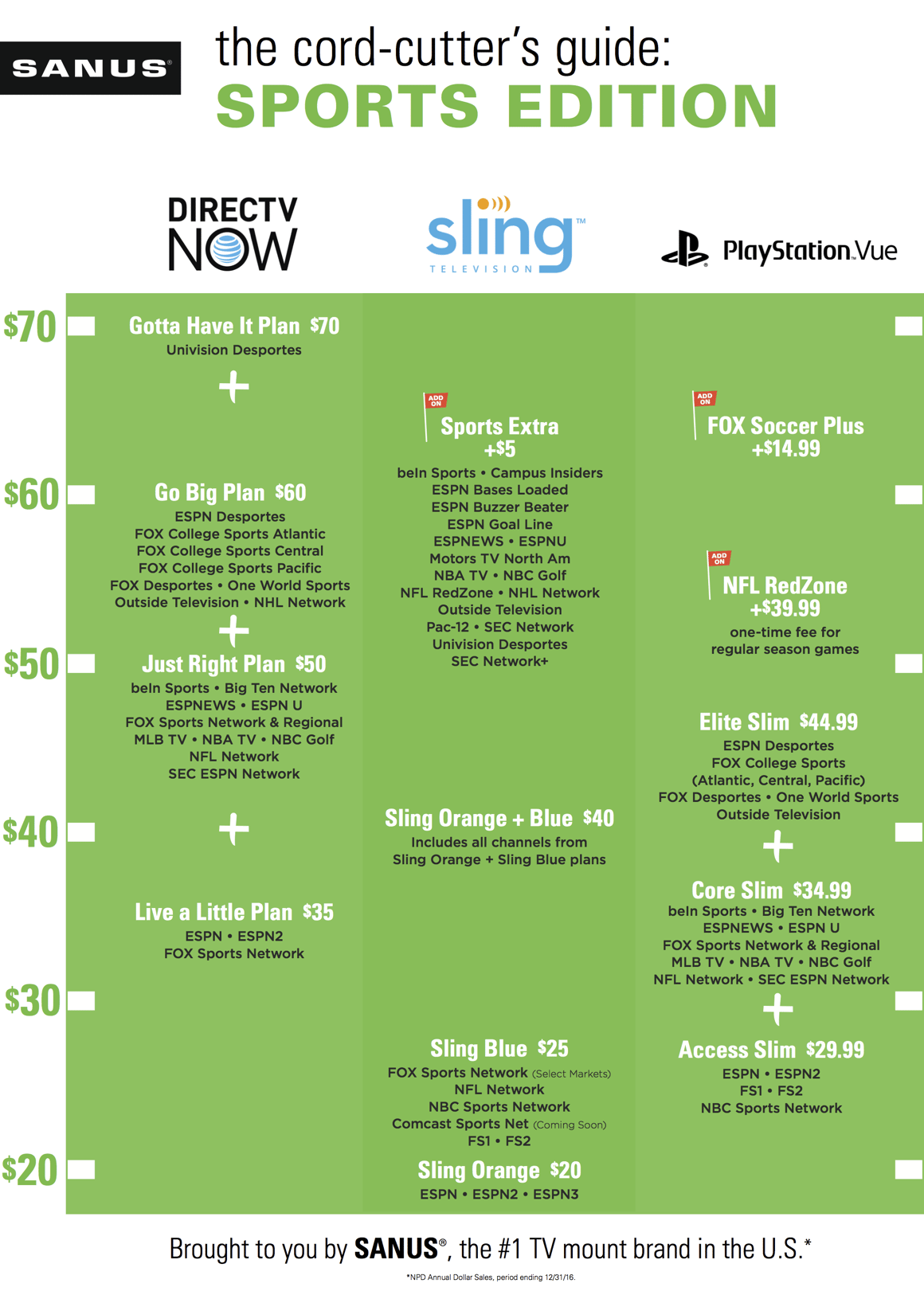
Several streaming services have gained popularity for sports coverage. Services like ESPN+and DAZNfocus heavily on live sports and exclusive content. Hulu + Live TV, YouTube TV, and Sling TVcombine sports channels with general entertainment, providing variety in one package.
Choosing the right platform depends on which sports and leagues you follow most closely. Have you checked which service broadcasts your favorite team’s games?
Subscription Costs
| Service | Monthly Cost | Free Trial |
|---|---|---|
| ESPN+ | $9.99 | 7 days |
| DAZN | $19.99 | 30 days |
| Hulu + Live TV | $69.99 | 7 days |
| YouTube TV | $72.99 | 14 days |
| Sling TV (Sports Extra) | Starting at $40 | 3 days |
Subscription fees vary widely, so consider how much you’re willing to spend monthly. Sometimes bundling services or choosing add-ons can get you better access at a lower overall cost.
Supported Sports
- ESPN+: Soccer (MLS, Serie A), UFC, college sports, and golf
- DAZN: Boxing, MMA, and some soccer leagues like the UEFA Champions League
- Hulu + Live TV: NFL, NBA, MLB, NHL, and local sports channels
- YouTube TV: NFL, NBA, MLB, NHL, and regional sports networks
- Sling TV (Sports Extra): NFL, NBA, college football, and international soccer
Not all sports are covered equally across platforms. Do you prefer watching major leagues or niche sports? Your choice should reflect the games you never want to miss.
Device Compatibility
Device compatibility plays a crucial role in watching sports without cable. Picking the right device ensures smooth streaming and easy access to your favorite games. Different devices offer varied features and user experiences. Knowing which device suits your needs helps you enjoy sports effortlessly.
Smart Tvs
Smart TVs allow direct access to sports streaming apps. No extra devices are needed. Most popular brands support apps like ESPN, Hulu, and YouTube TV. The large screen offers an immersive viewing experience. Check your TV’s app store to find compatible sports apps. Internet connection quality affects streaming performance on smart TVs.
Mobile Devices
Mobile devices offer great flexibility for watching sports anywhere. Smartphones and tablets support most sports streaming apps. Mobile apps often include live scores and highlights. Smaller screens may reduce viewing comfort but increase convenience. Use Wi-Fi or a strong cellular signal for better video quality. Mobile devices allow easy switching between games and apps.
Streaming Devices
Streaming devices connect to your TV to enable sports streaming. Examples include Roku, Amazon Fire Stick, and Google Chromecast. They support many sports apps with easy navigation. These devices often provide remote controls for simple use. They work well with older TVs lacking smart features. Ensure your streaming device supports your preferred sports service.
Internet Requirements
Watching sports online without cable needs a good internet connection. Your streaming experience depends on your internet speed and data limits. Meeting these requirements helps avoid buffering and interruptions during live games. Understanding internet needs improves your sports viewing setup.
Speed Recommendations
Fast internet speeds are essential for smooth sports streaming. For standard definition, aim for at least 3 Mbps. For high definition (HD), 5 to 8 Mbps works well. For 4K streaming, speeds above 25 Mbps are best. Lower speeds cause delays and poor video quality.
Data Usage Considerations
Streaming sports uses a lot of data. A single hour of HD streaming can use 3 to 7 GB. If your internet plan has data limits, watch your usage carefully. Unlimited data plans are better for frequent viewers. Tracking your data helps prevent extra charges or slowdowns.

Credit: www.rollingstone.com
Free Streaming Options
Watching sports without cable is easier with free streaming options. Many platforms offer live games and highlights at no cost. These options work well for casual viewers and those on a budget. You can catch your favorite teams and big events without paying monthly fees.
Network Websites
Major sports networks often stream games directly on their websites. Networks like ABC, CBS, NBC, and FOX provide free live sports during certain events. You might need to create a free account to access streams. These sites also offer replays, highlights, and sports news. Streaming on network websites is simple and legal.
Social Media Platforms
Social media platforms host many live sports streams and clips. Platforms such as Facebook, Twitter, and YouTube often show live sports events for free. Official league pages and team accounts post live videos and updates. These streams are easy to find by following your favorite teams. Social media also allows interaction with other fans during games.
Finding Sports Channels
Finding the right sports channels is key to enjoying your favorite games without cable. You want access to networks that cover the sports and teams you care about most. Luckily, there are plenty of options that let you watch live sports through streaming services or free broadcasts.
Local Sports Networks
Local sports networks are a goldmine for fans who follow hometown teams. These channels often broadcast regional games, including baseball, basketball, and hockey. Check if your streaming service offers access to networks like NBC Sports Regional, Fox Sports Networks, or regional affiliates of ESPN.
Many services like Hulu + Live TV, YouTube TV, and Sling TV include these regional channels in their packages. You can also use an HD antenna to capture local broadcasts for free, especially for NFL games or college sports. Have you tried scanning for channels with an antenna? It’s a simple way to get local sports without paying extra.
International Channels
If you’re a fan of soccer, cricket, or rugby, international channels are essential. Networks like beIN Sports, Eurosport, and TSN broadcast a wide range of global sports events. Streaming services such as FuboTV and DAZN specialize in international sports and often include these channels.
Some international channels require a VPN if you’re outside their broadcast region. This can expand your options and let you watch sports from around the world. What international sports do you wish you could watch more easily? Finding the right channel might be closer than you think.
Using Vpns For Access
Using a VPN for sports streaming helps bypass location restrictions. It masks your real IP address and makes it appear you are in another country. This lets you watch sports content not available in your region. A VPN can be a simple tool to get access to more games and channels without cable.
Overcoming Geoblocks
Geoblocks stop you from watching sports in certain areas. Streaming sites use your IP address to block content outside their region. A VPN changes your IP to one from a different country. This tricks the site into thinking you are allowed to watch. It helps you see live games and events anywhere.
Choosing A Vpn Service
Pick a VPN that offers fast and stable connections. Streaming sports needs smooth video without buffering. Look for VPNs with many server locations worldwide. This gives you more options to bypass geoblocks. Also, check if the VPN supports multiple devices. Good customer support and easy apps matter too.
Mobile Streaming Tips
Watching sports on your mobile device offers great freedom. You can catch the game anywhere. Yet, mobile streaming needs some smart tips. These help save data and improve viewing quality. Follow these easy ideas to enjoy sports without interruptions.
Data Management
Streaming sports uses a lot of data. Mobile plans often limit data. Control your data use to avoid extra charges.
- Use Wi-Fi whenever possible to save mobile data.
- Lower the video quality in the app settings to reduce data use.
- Download highlights or replays on Wi-Fi for offline viewing.
- Turn off background apps that use data during streaming.
Optimizing Performance
Good performance means smooth video and no buffering. Follow simple steps to keep streaming fast.
- Close other apps to free up phone memory and processing power.
- Choose a spot with strong signal strength for better connection.
- Use an updated streaming app to avoid bugs and crashes.
- Restart your device before streaming to clear temporary issues.
Recording And Replay Options
Cutting the cable cord doesn’t mean you have to miss out on your favorite sports moments. Recording and replay options give you the freedom to watch games at your convenience. These features help you catch every critical play, even if you’re away from the screen during the live broadcast.
Cloud Dvr Features
Cloud DVR lets you save games without needing a physical device. You simply press record, and the game is stored online for later viewing. This means you can access your recorded sports events from any device, whether it’s your phone, tablet, or smart TV.
Many streaming services offer generous storage limits, often ranging from 20 to 100 hours. Some even allow you to keep recordings indefinitely, so you can build your own sports library over time. Have you ever missed a crucial game-winning goal? Cloud DVR ensures you can rewind and watch it as many times as you want.
On-demand Replays
On-demand replays provide instant access to full games or key highlights after they air. This feature is perfect if you want to skip commercials or fast-forward to the most exciting moments. Streaming platforms usually update their sports content quickly, sometimes within minutes of the live game ending.
You don’t need to plan your day around a game schedule anymore. Imagine catching all the highlights from a weekend’s worth of matches during your lunch break. This flexibility lets you stay up-to-date with your favorite teams without sacrificing your personal time.
Managing Subscriptions
Managing your streaming subscriptions is key to enjoying sports without cable without breaking the bank. It’s easy to get overwhelmed by multiple apps and monthly fees. Staying organized helps you watch your favorite games and save money at the same time.
Bundling Services
Bundling streaming services can cut costs and simplify your viewing experience. Many providers offer package deals combining sports channels with entertainment or news. For example, you might find a bundle that includes ESPN+, Hulu, and Disney+ for a single monthly price.
Think about the sports you want to watch most and which services cover those games. Bundles often come with perks like ad-free viewing or access to exclusive content. Have you checked if your favorite sports service offers a combo deal with other apps you already use?
Canceling Subscriptions
Canceling subscriptions you don’t use often is just as important as choosing the right ones. Review your monthly bills and identify which services aren’t delivering value. If you only watch certain sports during a season, consider pausing or canceling services during the off-season.
Many platforms allow you to cancel anytime without penalties, so don’t hesitate to stop a service that doesn’t fit your current needs. How much could you save by cutting a subscription you rarely use? It’s worth checking before the next billing cycle.

Credit: www.billboard.com
Frequently Asked Questions
What Are The Best Streaming Services For Live Sports?
Top streaming services for live sports include ESPN+, Sling TV, Hulu + Live TV, and YouTube TV. They offer various sports channels and flexible subscription plans. Choose based on your favorite sports and budget for the best experience.
Can I Watch Sports Without A Cable Subscription?
Yes, you can watch sports without cable using streaming services or apps. Many platforms offer live sports coverage online. You just need a reliable internet connection and a compatible device.
Are There Free Options To Watch Sports Online Legally?
Some networks provide free live sports through their websites or apps. Platforms like Pluto TV and Tubi offer limited sports content legally. However, most live sports require paid subscriptions for full access.
How Do Streaming Devices Enhance Sports Viewing?
Streaming devices like Roku, Fire TV, and Chromecast enable easy access to sports apps. They offer high-quality streaming and user-friendly interfaces. These devices make watching sports on smart TVs simple and convenient.
Conclusion
Watching sports without cable is easier than ever. Streaming services offer many choices for live games. You can watch on your phone, tablet, or TV. Many options cost less than cable bills. Just pick the service that fits your needs.
No need for complicated setups or contracts. Enjoy your favorite teams anytime, anywhere. Stay connected to the action without extra fees. Sports fans can save money and still never miss a match. Simple, flexible, and affordable – that’s how to watch sports today.