How Do You Cancel Planet Fitness Membership: Easy Step-by-Step Guide
Thinking about canceling your Planet Fitness membership but not sure where to start? You’re not alone.
Many people join gyms with good intentions but later find they need to stop for one reason or another. The process can seem confusing or frustrating if you don’t know the exact steps. Don’t worry—you’re in the right place. You’ll learn exactly how to cancel your Planet Fitness membership smoothly and without hassle.
Keep reading, and you’ll be able to take control of your membership quickly and confidently.
Reasons To Cancel Membership
Deciding to cancel your Planet Fitness membership can stem from various personal reasons. Understanding these reasons helps you make a clear choice and prepares you for the cancellation process. It’s important to reflect on your own situation before moving forward.
Changes In Fitness Goals
Your fitness goals may evolve over time. Maybe you’ve shifted focus from gym workouts to outdoor activities like running or cycling. Or perhaps you’ve found a new sport or fitness class that better suits your interests and schedule.
Are you still motivated by the same workouts you used to enjoy? If not, canceling your membership might be a smart choice to avoid paying for a service you no longer use.
Relocation Or Travel
Moving to a new city or country can make it difficult to continue using your local Planet Fitness. Even frequent travel for work or personal reasons might limit your gym visits. In these cases, holding onto your membership could become costly and inefficient.
Have you considered whether your new location has a Planet Fitness or a comparable gym? If not, canceling could save you money while you explore local options.
Financial Constraints
Budget changes can force you to cut down on non-essential expenses. If your gym membership feels like a luxury you can’t afford right now, canceling is a responsible step. It helps you focus your finances on essentials without guilt.
Are there less expensive ways to stay active that fit your current budget? This question often guides the decision to cancel and find affordable alternatives.
Lack Of Use Or Motivation
You might find that despite your best intentions, you’re not visiting the gym regularly. This lack of use means you’re paying for something you don’t fully benefit from. It’s common to lose motivation or find other commitments taking priority.
Have you tracked your gym attendance lately? A pattern of missed visits could signal that canceling your membership makes more sense than continuing to pay for unused access.
Health Issues Or Injuries
Sometimes health problems or injuries prevent you from working out. Continuing to pay for a gym you can’t use might add stress rather than relief. Cancelling your membership gives you space to recover without extra financial pressure.
Do you have a clear timeline for returning to exercise? If uncertainty lingers, canceling could be a practical choice until you’re ready to rejoin.

Credit: www.tiktok.com
Reviewing Membership Agreement
Reviewing your Planet Fitness membership agreement is crucial before canceling. This document holds key details about cancellation rules and fees. Knowing these points helps avoid surprises and extra charges.
Each membership agreement might differ by location and membership type. Take time to read the cancellation section carefully. It usually explains how to cancel, notice periods, and any penalties.
Check for any special clauses about freezing or transferring your membership. Some agreements allow pausing your membership instead of canceling. This could be a better option in some cases.
Locate The Cancellation Policy In The Agreement
The cancellation policy is often in the contract’s fine print. Look for headings like “Termination,” “Cancellation,” or “Membership End.” This section tells you how and when you can cancel.
Understand Notice Periods And Fees
Most agreements require a notice period. This period can range from 30 to 90 days. You may need to pay fees if you cancel early. Knowing these details helps plan your cancellation properly.
Check For Required Cancellation Methods
Some agreements require you to cancel in person or by certified mail. Others may accept email or phone requests. Follow the exact method to ensure your cancellation is accepted.
Look For Membership Freeze Options
Freezing lets you pause your membership for a set time. This option might save money if you plan to return. Check the agreement for fees and maximum freeze duration.
Identify Any Penalties Or Refunds
Penalties can include cancellation fees or lost deposits. Some agreements offer partial refunds for unused time. Understanding these terms avoids unexpected costs.
Cancellation Options
Cancelling your Planet Fitness membership can feel like a hassle, but knowing your options makes the process smoother. You don’t have to stick with one way to cancel; there are several paths you can take depending on what’s most convenient for you. Understanding these options helps you avoid unexpected fees and ensures your membership ends on your terms.
In-person Cancellation
Visiting your local Planet Fitness club to cancel your membership is often the most straightforward way. You’ll need to speak directly with a staff member, fill out a cancellation form, and present a valid ID. This method gives you immediate confirmation that your request has been processed.
Keep in mind, some clubs require a 30-day notice period before cancellation takes effect. Stopping by also lets you ask questions in real time, which can clear up any confusion about fees or final billing.
Online Cancellation
Not all Planet Fitness locations offer online cancellation, but some do provide this option through their website or member portal. Check your membership account to see if you can submit a cancellation request digitally. This option is convenient if you prefer handling things without leaving home.
Make sure to save any confirmation emails or screenshots after submitting your request online. It’s your proof that you initiated cancellation, which can be useful if any billing disputes arise later.
Cancellation Via Phone
Calling Planet Fitness customer service to cancel your membership is another option, though it may not be available everywhere. When you call, have your membership details ready and be prepared for a possible retention offer to keep you as a member.
If you decide to proceed, request a confirmation number or email as proof of cancellation. Phone cancellation can feel quicker, but always verify the process to avoid unexpected charges.
Preparing Required Documents
Preparing the right documents makes canceling your Planet Fitness membership easier. These documents prove your identity and membership details. Having them ready speeds up the process and avoids delays. Gather everything before starting your cancellation.
Membership Card Or Account Number
Keep your Planet Fitness membership card handy. It has your account number and personal details. If you do not have the card, find your account number on billing statements or emails. This number helps staff locate your membership quickly.
Photo Identification
Bring a valid photo ID to confirm your identity. A driver’s license or passport works well. Staff need to match your ID with your membership information. This step prevents unauthorized cancellations.
Written Cancellation Request
Prepare a written cancellation letter or form. Include your full name, account number, and reason for cancellation. Sign and date the letter. Some clubs require this to process your cancellation request.
Proof Of Medical Condition (if Applicable)
If canceling due to health reasons, include a doctor’s note. The note should explain why you cannot continue your membership. This document supports your request and may waive fees.
Payment Receipts Or Billing Statements
Keep recent payment receipts or billing statements. They confirm your membership status and payment history. These papers can help resolve any billing questions during cancellation.
Step-by-step Cancellation Process
Cancelling your Planet Fitness membership doesn’t have to be confusing or time-consuming. Knowing exactly what to do can save you from unexpected fees and frustration. The process is straightforward if you follow the right steps carefully.
Visiting The Gym
You need to go to the Planet Fitness location where you signed up to cancel your membership. This is important because cancellation requests must be handled in person. Bring a valid photo ID and your membership details to make the process smoother.
Try to visit during off-peak hours to avoid long wait times. Have you ever tried cancelling something only to be caught in a long line? Avoid that by planning your visit wisely.
Completing The Cancellation Form
Once you’re at the gym, ask the front desk for the cancellation form. Fill it out carefully with all required information, such as your name, membership ID, and reason for cancelling. Make sure to double-check everything before submitting.
If you need help, staff members are usually willing to assist. Don’t hesitate to ask questions if any part of the form is unclear. This step is crucial because an incomplete form can delay or invalidate your cancellation.
Getting Confirmation
After submitting your cancellation form, request a written confirmation. This can be an email or a printed receipt from the gym. Keep this confirmation safe as proof of your cancellation.
Have you ever thought about what happens if you don’t get a confirmation? Without it, you might continue getting billed. Always confirm your cancellation to protect yourself from unexpected charges.

Credit: www.tiktok.com
Handling Common Challenges
Cancelling a Planet Fitness membership can sometimes come with a few hurdles. Many people face common challenges that make the process confusing or frustrating. Understanding these issues can help you handle them smoothly and avoid extra fees or delays.
Dealing With Contract Clauses
Planet Fitness memberships often include contract terms that affect cancellation. Some contracts require a notice period before cancellation takes effect. Others may have early termination fees if you cancel too soon. Reading your contract carefully is important.
Look for sections about cancellation rules and fees. Keep a copy of your contract handy during cancellation. If unclear, ask the gym staff or customer service to explain these clauses. Knowing your rights helps prevent surprises.
Addressing Billing Issues
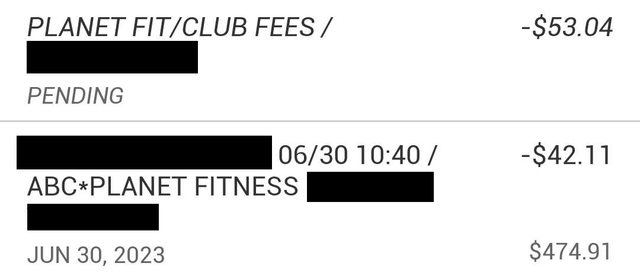
Billing problems can occur after you cancel. Sometimes charges continue due to delayed processing. Your bank or credit card may show unexpected deductions. Monitoring your statements is essential after cancellation.
Contact Planet Fitness billing if charges persist. Provide cancellation proof like emails or receipts. Request confirmation that your membership is fully cancelled. Keep records of all communication for reference.
Alternatives To Cancelling
Before you decide to cancel your Planet Fitness membership, consider some alternatives that might better suit your current situation. Sometimes, pausing your fitness journey or handing over your membership to someone else can save you money and hassle. These options allow you to keep your connection with the gym without fully committing or walking away.
Freezing Membership
Freezing your Planet Fitness membership lets you put your payments and access on hold temporarily. This is helpful if you’re traveling, recovering from an injury, or facing financial challenges but plan to return soon.
Most Planet Fitness locations allow you to freeze your membership for a small monthly fee, usually around $10. You can request the freeze by calling your home gym or visiting in person. Just remember to check the maximum freeze duration allowed so you don’t lose your spot.
Transferring Membership
If you’re moving or no longer want to attend your current Planet Fitness, transferring your membership might be a smart alternative. You can pass your membership to a friend or family member who can benefit from your account.
To transfer, contact Planet Fitness customer service and provide the new member’s details. Transfers often require approval, so it’s good to ask about any paperwork or fees involved upfront. This option keeps your membership active and avoids cancellation penalties.
Tips For Future Gym Memberships
Planning ahead can save you a lot of hassle with gym memberships. Knowing what to look for before you sign up helps you avoid unwanted fees and complicated cancellation processes later on. Here are some practical tips to keep in mind for your future gym memberships.
Evaluating Contract Terms
Before committing, carefully read through the contract. Check the length of the agreement and any automatic renewal clauses. If the contract locks you in for a year or more, ask yourself if you’re ready for that commitment.
Look for any hidden fees like initiation charges or maintenance costs. Some gyms offer flexible month-to-month plans that might suit your lifestyle better. Have you ever been stuck paying for a service you barely used? That experience can teach you to scrutinize terms closely.
Understanding Cancellation Policies
Cancellation rules vary widely between gyms, so it’s crucial to understand them upfront. Find out how much notice you need to give and what forms of cancellation are accepted—some gyms require in-person visits, others accept email or mail.
Ask if there are any penalties for early cancellation or if you need to provide proof of relocation or medical issues. Knowing these details can prevent surprises and save you money. How would you feel if you were charged after already deciding to quit? Being clear on cancellation policies protects you from that frustration.

Credit: www.tiktok.com
Frequently Asked Questions
How Do I Cancel My Planet Fitness Membership?
To cancel, visit your home club and submit a written cancellation form. Some locations allow mail or in-person cancellation only. Check your membership agreement for specific instructions and any required notice period.
Can I Cancel Planet Fitness Membership Online?
No, Planet Fitness does not offer online cancellation. You must cancel in person or by certified mail to your home club. Always verify your club’s specific cancellation policy before proceeding.
Is There A Fee To Cancel Planet Fitness Membership?
Typically, there is no cancellation fee after the initial contract ends. Early cancellation might incur fees or require a 30-day notice. Review your contract terms carefully to avoid unexpected charges.
How Long Does Planet Fitness Take To Cancel Membership?
Cancellation processing usually takes 30 days from the day they receive your request. You may be billed during this period, so plan accordingly. Confirm cancellation completion with your home club to avoid extra charges.
Conclusion
Canceling your Planet Fitness membership is simple with clear steps. Contact the gym directly or send a cancellation letter. Keep proof of your request to avoid issues. Check for any final fees or notice periods. Taking action early helps you avoid extra charges.
Staying informed makes the process smooth and stress-free. You control your membership and budget easily. Choose what works best for your fitness needs now.